Most businesses think they’re secure once they enable multi-factor authentication (MFA). Strong passwords? Check. MFA enabled everywhere? Check. Problem solved, right?
Not anymore.
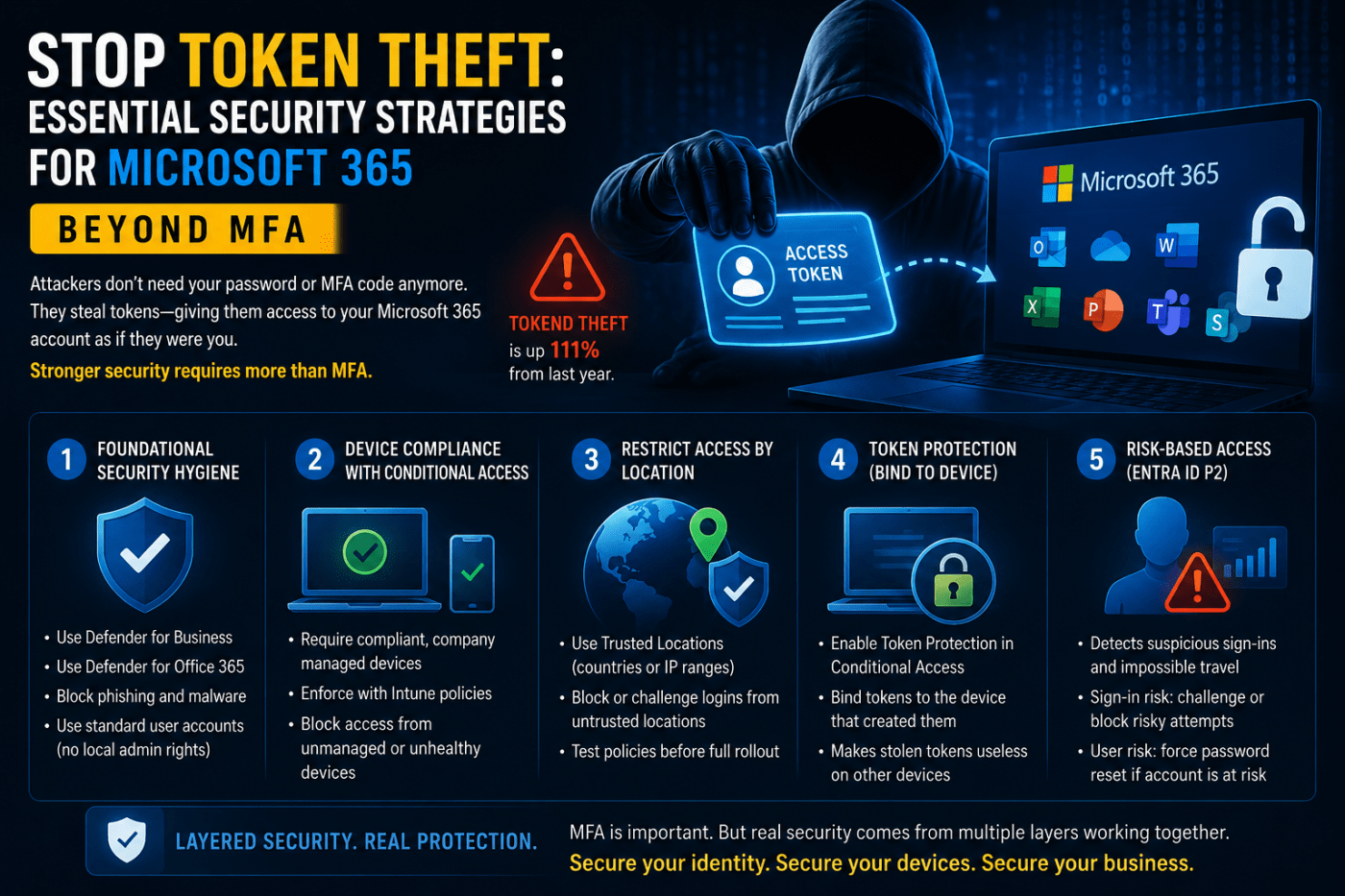
Attackers have shifted tactics. Instead of trying to steal passwords, they’re now stealing something far more valuable: session tokens. And the numbers are ugly. Token theft attacks jumped by 111% last year alone.
So What Exactly Is Token Theft?
Think of it like an amusement park.
You buy a ticket at the entrance. The staff checks your identity once, then hands you a wristband or ticket that gives you access to every ride inside the park. After that, nobody keeps checking your ID over and over again. The ticket proves you already authenticated.
Microsoft 365 works the same way.
Your username, password, and MFA approval are the “entry check.” Once Microsoft verifies you, it gives your device a session token. That token stays stored on your machine so you don’t have to log in every time you open Outlook, Teams, OneDrive, or SharePoint.
Here’s the problem:
Hackers don’t necessarily need your password anymore. They just need that token.
If they steal it, they can use it to access your account as if they were you. No password prompt. No MFA challenge. No warning.
And in many cases, the user has absolutely no idea it happened.
How Attackers Actually Steal Tokens
Most token theft starts with phishing.
A user receives an email with a malicious link or attachment. They click it. Malware gets installed quietly in the background. That malware searches the browser or operating system for stored session tokens and sends them back to the attacker.
The dangerous part is how invisible this attack is.
The attacker usually doesn’t reset passwords or trigger obvious alerts. They simply sit inside the environment reading emails, downloading files, and moving laterally while Microsoft sees the activity as completely legitimate because the token itself is valid.
That’s why traditional MFA alone can’t stop this attack.
Step One: Fix Basic Security Hygiene
If your company uses Microsoft 365 Business Premium, you already have solid security tools available. Most organizations just never configure them properly.
Start with the basics:
- Use Defender for Business
- Enable Defender for Office 365
- Protect every endpoint
- Block phishing wherever possible
But one of the biggest mistakes companies still make is giving users local administrator rights.
That needs to stop.
If malware lands on a device where the user has admin privileges, the attacker suddenly has far more access to sensitive system data, including stored tokens. Standard user accounts dramatically reduce that risk.
Convenience is not a security strategy.
Strategy #1: Only Allow Trusted Devices
One of the smartest defenses against token theft is Conditional Access with device compliance.
Instead of only verifying the user, Microsoft also verifies the device itself.
In simple terms, the system asks:
“Is this a trusted company-managed device?”
Using Microsoft Intune, you can define what counts as compliant:
- TPM security chip enabled
- BitLocker encryption active
- Updated Windows version
- Antivirus running properly
- Device registered with the organization
Then, through Conditional Access, you block access from anything that fails those checks.
So even if an attacker steals a valid token, it becomes useless if they try using it from an unmanaged laptop.
That’s the difference between identity-only security and layered security.
Strategy #2: Restrict Access by Location
By default, Microsoft 365 can be accessed from almost anywhere in the world.
That’s great for remote work.
It’s also great for attackers.
If someone in another country steals a token, they can often access your environment immediately unless restrictions are in place.
This is where Trusted Locations become important.
You can define:
- Approved countries
- Office IP ranges
- Trusted network locations
Then build Conditional Access policies around them.
For example:
If a login attempt comes from outside approved locations, you can:
- Force another MFA challenge
- Block access entirely
- Require a compliant device
But don’t rush this rollout.
Bad Conditional Access policies can lock out your own employees fast. Test everything on a small pilot group first and monitor sign-in logs carefully before deploying company-wide.
Strategy #3: Enable Token Protection
This is one of the most important newer protections Microsoft offers.
Normally, a token can potentially be reused elsewhere after it’s stolen. Token Protection changes that by binding the token to the original device that created it.
Think of it like adding a photo ID to the ticket.
Even if someone copies the ticket, they can’t use it unless they’re on the same trusted device.
You can configure this through Conditional Access session controls for supported Microsoft 365 apps like:
- Exchange Online
- SharePoint
- Teams
Right now, support is strongest on Windows devices.
Once enabled, stolen tokens become dramatically less useful to attackers.
Advanced Protection with Entra ID P2
If your organization wants deeper protection, Entra ID P2 adds risk-based intelligence.
This is where Microsoft starts analyzing behavior patterns in real time.
For example:
- A user signs in from London
- Five minutes later there’s another sign-in attempt from New York
That’s physically impossible.
Microsoft flags it immediately.
The platform also detects:
- Anonymous IP addresses
- Suspicious hosting providers
- Dark web credential exposure
- Unusual sign-in behavior
Two policies matter most here:
Sign-in Risk Policy
If a specific login attempt looks suspicious, Microsoft can:
- Force MFA again
- Block the login
- Require stronger verification
User Risk Policy
If the account itself appears compromised, Microsoft can:
- Force an immediate password reset
- Block access until remediation happens
These protections matter because static rules alone eventually fail. Attackers adapt constantly. Behavioral monitoring gives you a second layer that reacts in real time.
Final Reality Check
MFA is still important.
But treating MFA as “mission accomplished” is outdated thinking.
Attackers evolved. Most companies didn’t.
Modern Microsoft 365 security requires multiple layers:
- Endpoint protection
- Device compliance
- Conditional Access
- Trusted locations
- Token protection
- Risk-based monitoring
The organizations getting breached today usually aren’t missing MFA anymore.
They’re missing everything that should come after MFA.
And that’s the part most businesses still haven’t figured out.
 Salman Tariq
 SalmanTechBlogs
Leave a comment