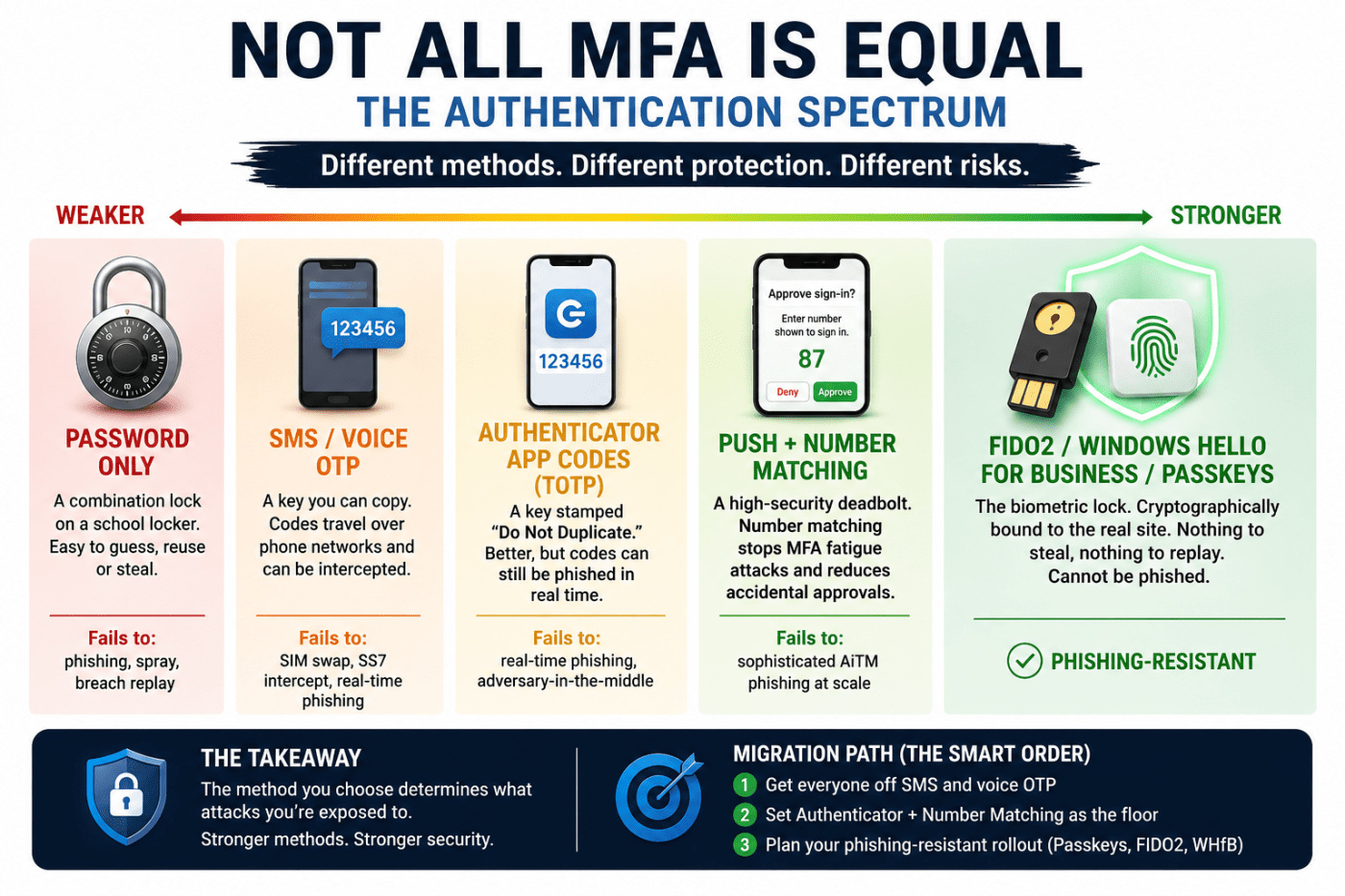
Most people think “we have MFA, so we are safe.” That’s not really true.
The real question is not whether you have multi-factor authentication, but what kind of authentication you are using, and how easily it can be bypassed.
Think of it like this: all locks are not equal. A basic padlock and a high-security smart lock both “lock a door,” but they don’t offer the same protection.
Authentication works the same way.
Passwords only: the weakest starting point
Passwords alone are like a school locker combination.
- Anyone who sees it once can reuse it
- If it appears in a data breach, attackers will try it everywhere
- Users often reuse the same password across sites
Main risk: phishing and leaked password reuse attacks
In simple terms: this is no longer enough for anything important.
SMS or voice OTP: slightly better, still weak
This is when you get a code via text or phone call.
It feels safer, but the problem is the code travels through the phone network.
Attackers can:
- Hijack your phone number (SIM swap)
- Intercept messages in rare telecom attacks
- Trick users with fake login pages in real time
Main risk: SIM swap attacks and phishing
It’s better than passwords, but still not strong security.
Authenticator app codes (TOTP)
This is what apps like Google Authenticator or Microsoft Authenticator use.
Codes change every 30 seconds, which makes it harder to reuse them.
But there is still a problem:
If you enter the code into a fake login page, attackers can steal it instantly and reuse it before it expires.
Main risk: real-time phishing attacks
This is where many companies stop, thinking they are safe. They are not.
Push notifications with number matching
This is where you get a login approval request on your phone.
Number matching improves security because you must type a number shown on the screen into your app.
This stops “spam approvals” where attackers repeatedly push login requests hoping you click “approve” by mistake.
Main risk: advanced phishing setups that act in real time
This is a solid middle ground, but still not perfect.
FIDO2, Passkeys, and Windows Hello: phishing-resistant security
This is currently the strongest option available.
Instead of sending codes, your device uses cryptographic keys that:
- Are created on your device
- Never leave your device
- Only work for the real website they were created for
Even if you enter your details on a fake website, nothing usable is shared with attackers.
Main advantage: phishing simply does not work here
This is not “hard to hack.” It is designed so hacking via phishing is not possible.
Why this matters more than people think
Most attacks today don’t “break in.” They trick users into logging in.
That means your security depends less on passwords and more on:
- What authentication method you use
- Whether it can be tricked in real time
- Whether attackers can replay what they steal
Some methods fail easily. Others are built to stop entire attack categories.
MFA fatigue attacks: a real-world problem
Attackers often already have your password.
Then they spam your phone with login requests until you get annoyed or confused and approve one.
This is not theory. It has been used in real breaches.
Number matching helps fix this by forcing you to confirm the login request with a specific code shown on the screen.
The hidden problem in most organisations
Many companies unknowingly run two systems at once:
- A modern authentication policy
- An older legacy MFA system
These can conflict and cause inconsistent security settings.
This leads to situations where:
- Some users are protected properly
- Others are still exposed to weaker methods
- Security policies don’t behave as expected
This is a common blind spot in real-world environments.
A realistic migration path
If you are improving security in an organisation, don’t try to do everything at once.
Start in this order:
- Remove SMS and voice OTP
- Standardise on authenticator app with number matching
- Prepare for phishing-resistant methods
- Move users to passkeys, FIDO2, or Windows Hello
Each step reduces a major attack risk.
Final takeaway
Not all MFA is equal.
Some methods only stop basic attacks. Others stop modern phishing completely.
If your organisation still relies on SMS or basic OTP, you are not “secure,” you are just “less exposed than before.”
Real security starts when authentication becomes phishing-resistant by design, not by hope.
 Salman Tariq
 SalmanTechBlogs
Leave a comment