In today’s digital world, cyber threats have become increasingly sophisticated, with fraudsters using tactics like impersonation to deceive businesses and individuals. Impersonation attacks can lead to financial losses and reputational damage, making it crucial for organizations to implement robust security measures.
Introduction
In this blog, I will be highlighting the importance of safeguarding your business against impersonation attacks and also discussing how fraudsters can impersonate key personnel within a company to deceive employees into taking actions that could compromise security.
Understanding Impersonation Attacks
Fraudsters conduct thorough research on a business to gather information on key figures, such as the CEO and employees in critical roles. By creating fake email addresses that closely resemble legitimate ones, they trick unsuspecting individuals into carrying out unauthorized actions, such as transferring money to fraudulent accounts.
Leveraging Microsoft 365 Impersonation Protection
For Microsoft 365 users, there is a valuable tool available to combat impersonation attacks: Impersonation Protection, a feature included in Defender for Office 365. You can configure this protection to shield your organization from malicious actors seeking to impersonate your employees.
Configuring Impersonation Protection
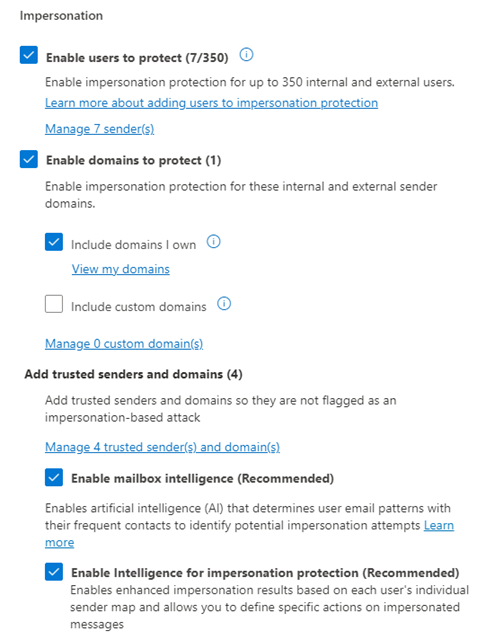
To set up Impersonation Protection in Microsoft 365, users can access the security settings through the admin portal. You can enable user protection, adding key personnel to the safeguard list, and specifying domains to protect against impersonation attempts.
Log on to https://security.microsoft.com/
Access Email & Collaboration – Policies & rules – Threat Policies – Anti-phishing
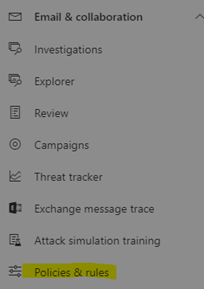

I created a rule called Impersonation Rule.

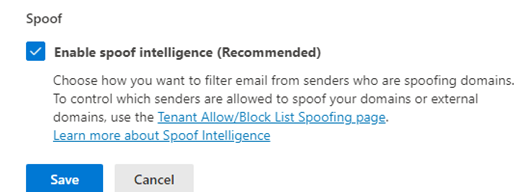
Click on “Edit Protection settings” after opening it and set them as follows as best practice. Add the senders to protect them from impersonation attack.

Advanced Protection Features
In addition to basic configuration steps, I used advanced options that leverage artificial intelligence (AI) to enhance mailbox intelligence. By enabling these features, businesses can automatically identify and mitigate potential impersonation threats, even in complex scenarios involving external parties sharing similar names.
Conclusion
In conclusion, safeguarding your business against impersonation attacks is crucial in today’s digital landscape. By leveraging the Impersonation Protection feature in Microsoft 365, organizations can fortify their security posture and mitigate the risks posed by cyber criminals. Implementing these security measures is essential to protecting sensitive information, financial assets, and the reputation of your business.
 Salman Tariq
 SalmanTechBlogs
Leave a comment