Phishing-Resistant, Passwordless Authentication Done Right
Passwords are still the weakest link in identity security. Users reuse them, forget them, and hand them over to phishing sites without realising it. Entra ID synced passkeys offer a better path forward: strong, phishing-resistant authentication without the friction of hardware tokens or complex recovery processes.
Built on FIDO2 and WebAuthn standards, synced passkeys combine high security with everyday usability. They work across devices, rely on biometrics or device PINs, and remove passwords from the sign-in flow entirely.
This guide explains what synced passkeys are, why they matter, and how to enable them in Entra ID, step by step.
From Passwords to Synced Passkeys
Traditional passwords fail because they are shared secrets. Once stolen, they can be reused anywhere. Phishing works precisely because users are trained to type credentials into websites.
Synced passkeys change this model. Instead of a password, authentication is based on cryptographic keys tied to the user and protected by the device. There is nothing to type, and nothing for attackers to steal or replay.
For organisations, this means stronger security with fewer support calls. For users, it means faster sign-ins without memorising or resetting passwords.
FIDO Authentication and Why Syncing Matters
Device-Bound FIDO Keys
Early FIDO implementations relied on hardware security keys or device-bound credentials. Each device stored a private key, while the public key was registered with the service.
This approach is extremely secure and fully phishing-resistant. However, it comes with operational downsides. If a user loses the device or hardware key, recovery often requires IT intervention. Carrying extra hardware also limits adoption.
Synced Passkeys
Synced passkeys keep the same FIDO2 cryptographic model but remove the single-device dependency. The private key is securely synced using trusted platform services such as Apple Keychain, Google Password Manager, or supported password managers.
When a user switches devices or replaces a phone, their passkey comes with them. This significantly improves usability without sacrificing security.
Attestation and Trust
During sign-in, the device proves three things:
- The user possesses the registered passkey
- The passkey is unlocked using biometrics or a device PIN
- The authentication is happening on a trusted device
This process, known as attestation, ensures that credentials cannot be phished, replayed, or used outside their intended context.
Enabling Synced Passkeys in Entra ID
Authentication Methods and Preview Features
Sign in to the Entra ID portal and navigate to Authentication methods. Synced passkeys are currently available through public preview, so preview features must be enabled.
You will see multiple authentication options, including FIDO2 security keys and QR code sign-in. QR codes are useful for shared or kiosk scenarios, but passkeys are the focus for most user sign-ins.
Default Authentication Method Settings
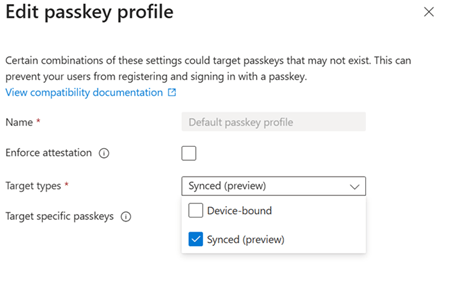
Within authentication method settings, configure passkeys as the preferred option over device-bound FIDO keys.
Be careful with strict attestation enforcement at this stage. Some enforcement settings may exclude synced passkeys. During rollout, it is best to allow synced passkeys explicitly and test before tightening restrictions.
These settings can be adjusted or reverted easily, making phased deployment low risk.
Configuring FIDO2 and Synced Passkey Policies
Navigate to Policies, then Passkeys (FIDO2), and enable the service.
You can:
- Target all users or specific groups
- Allow self-service registration
- Apply the default passkey profile you selected earlier
If you want to restrict which passkey providers are allowed, use AAGUID filtering. Microsoft provides a list of AAGUIDs on GitHub for trusted providers such as:
- Microsoft Edge on macOS
- Apple iCloud Keychain
- Google Password Manager
- Samsung Pass
- Bitwarden
Adding approved AAGUIDs ensures only trusted implementations are accepted.
What Users Experience
Registering a Passkey
Users register passkeys through myaccount.microsoft.com under Security info. Existing MFA may be required before registration.
They select Add sign-in method, choose Passkey, and follow the on-screen prompts. The device requests biometric or PIN verification, and the passkey is stored securely.
Users can name the passkey for easy identification, such as “Work Mac” or “Company Laptop”.
Signing In
Once registered, users no longer enter a username and password for supported sign-ins. Instead, they approve the request using their device biometrics or PIN.
The experience is fast, familiar, and consistent across devices. Conditional Access policies should be reviewed to ensure passkeys are allowed and recognised as compliant authentication methods.
Benefits and Deployment Considerations
Security and Usability Gains
Synced passkeys eliminate phishing by design. There are no passwords to steal, reuse, or trick users into entering.
Users do not need hardware tokens, and device changes no longer create recovery headaches. Cloud-backed syncing handles continuity securely.
Because passkeys rely on standards already used by modern operating systems, adoption feels natural rather than forced.
Rolling It Out Successfully
A practical deployment approach includes:
- Starting with a pilot group
- Reviewing Conditional Access policies for conflicts
- Expanding gradually across the organisation
Most organisations see reduced support tickets as users self-register and sign in without issues.
Final Thoughts
Entra ID synced passkeys represent a major step forward in passwordless authentication. They combine FIDO2-level security with the convenience users expect from modern devices.
By removing passwords from the equation, organisations reduce phishing risk while improving the sign-in experience. With straightforward configuration and flexible rollout options, there is little reason to delay adoption.
Enable the preview, test with a small group, and build from there. The passwordless future is already here, and synced passkeys make it practical at scale.
 Salman Tariq
 SalmanTechBlogs
Leave a comment