Understanding Microsoft 365 properly can have a real impact on how organizations manage security and productivity in 2026. As businesses continue to rely heavily on cloud services, many long standing misconceptions still create unnecessary risk. This article breaks down five common Microsoft 365 myths that continue to mislead business owners, IT administrators, and managed service providers.
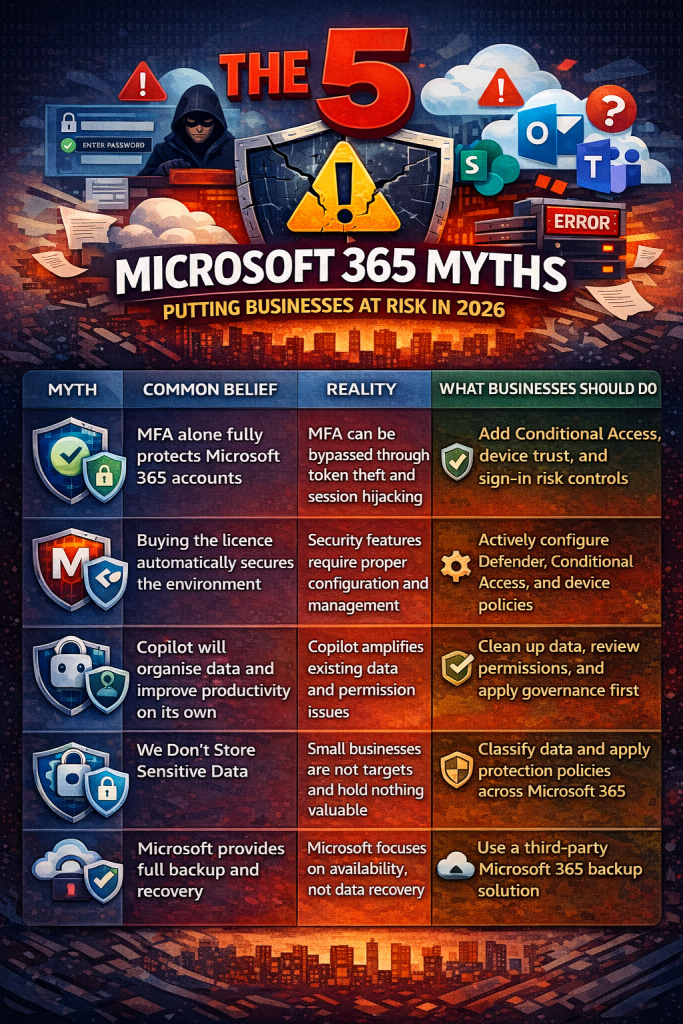
Myth 1: MFA Means We Are Fully Secure
Multi Factor Authentication is an essential security control, but it is often misunderstood. MFA reduces risk, but it does not eliminate it. In recent years, attackers have increasingly bypassed MFA by stealing session tokens or hijacking active logins after a user has already authenticated.
Why MFA on its own is not enough:
- It does not protect an active session once a user is signed in
- It does not verify whether the device being used is trusted
- It does not always consider the user’s location or behaviour
MFA should be treated as a basic requirement, not a complete security solution. It is comparable to a seatbelt. Important, but not sufficient on its own.
Myth 2: Business Premium Is Secure by Default
Microsoft 365 Business Premium includes powerful security features, but buying the licence alone does not make an environment secure. Many organisations never configure the tools they are paying for, leaving key protections unused.
Important points to understand:
- A licence provides access, not protection
- Features like Conditional Access and Microsoft Defender must be configured correctly
- Devices, users, and access policies must be actively managed
Without proper setup and ongoing management, Business Premium delivers far less security than most businesses expect.
Myth 3: Copilot Will Automatically Improve Everything
Copilot is a powerful productivity tool, but it is not a fix for poor data structure or weak permissions. It works by using the data and access rules already in place. If those are poorly managed, Copilot can expose problems rather than solve them.
The reality of Copilot:
- It enhances what already exists instead of correcting issues
- It does not replace good governance or IT oversight
- Clean data and clear permissions are essential
Organisations with well structured data will benefit the most. Those without it may create confusion or risk.
Myth 4: We Do Not Store Sensitive Data
Many small and medium sized businesses believe they do not hold valuable data. This is rarely true. Even basic business operations involve information that attackers find useful.
Common types of sensitive data include:
- Customer contact and relationship data
- Employee personal and payroll information
- Email access that can be used to reach other systems
If your business has customers, employees, or online accounts, your data has value and should be protected accordingly.
Myth 5: Microsoft Automatically Backs Up Everything
One of the most dangerous misconceptions is the belief that Microsoft provides full backups for Microsoft 365 data. Microsoft focuses on keeping its services available, not on protecting customers from accidental deletion, data corruption, or ransomware.
What Microsoft does and does not cover:
- Microsoft ensures platform availability
- Accidental deletion and ransomware recovery are not guaranteed
- Data outside retention limits cannot be restored
A separate backup solution is essential for proper data protection.
Conclusion
These myths persist because Microsoft 365 is often misunderstood. Security in the cloud is not automatic and it is not static. It requires planning, configuration, and ongoing review.
If you are responsible for Microsoft 365 in your organisation, use this information to reassess your current setup for 2026. Make sure you are using the tools you already pay for and that your data and users are properly protected. Strong security is not a one time task. It is an ongoing responsibility.
 Salman Tariq
 SalmanTechBlogs
Leave a comment