Choosing the right Microsoft 365 license can feel harder than it should. There are a lot of options. The names are not always intuitive. Small differences can have a big impact on cost and capability.
This guide breaks it all down in plain English. We will examine Microsoft 365 licenses based on audience. We’ll explain what you actually get. We will also share UK pricing excluding VAT. Additionally, we’ll highlight where each plan works best. Whether you are an individual, a small business, or a large enterprise, this should help you make a confident choice. It should also help if you are part of education or frontline teams.
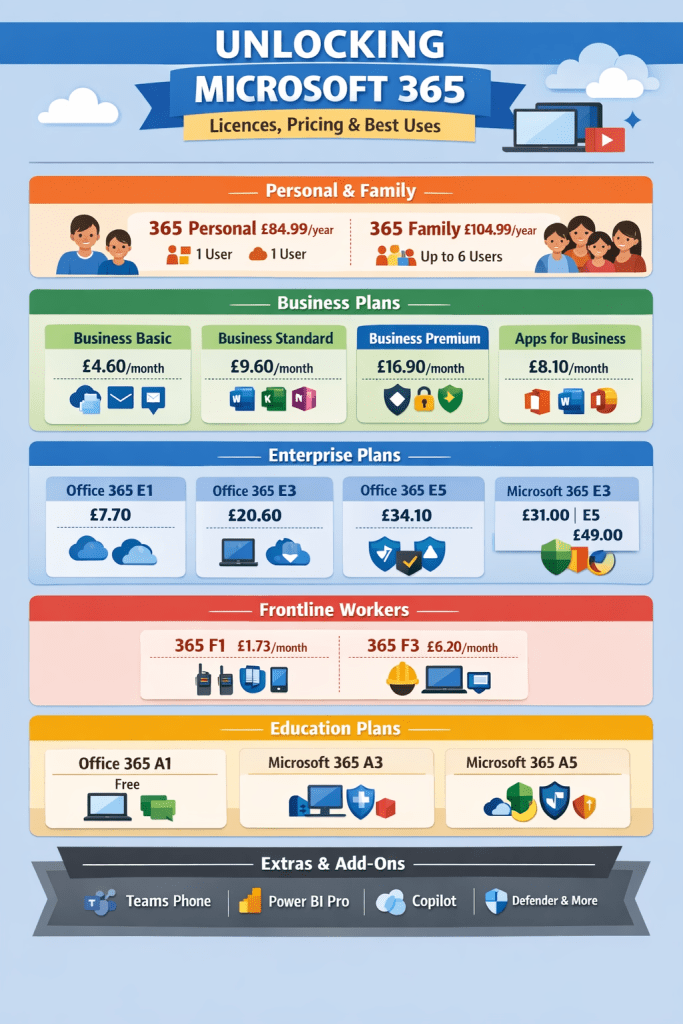
Microsoft 365 for Personal and Family Use
If you are managing your own work or supporting a household, Microsoft keeps things fairly simple.
Microsoft 365 Personal
- Price: £84.99 per year or £8.49 per month
- Users: 1
- Includes: Full desktop Office apps, 1 TB OneDrive storage
This plan is ideal for personal productivity. Think documents, spreadsheets, presentations, and cloud backups across multiple devices.
Microsoft 365 Family
- Price: £104.99 per year or £10.49 per month
- Users: Up to 6
- Includes: Full desktop Office apps, 1 TB OneDrive storage per user
Great value for households. Everyone gets their own storage and apps, while sharing a single subscription.
Best for: Everyday tasks, home organization, schoolwork, and personal projects.
Small and Medium Business Plans
Flexible Options for Growing Teams
For organizations with up to 300 users, Microsoft 365 Business plans are designed to scale without unnecessary complexity.
Business Basic
- Price: £4.60 per user per month
- Includes: Web and mobile Office apps, Teams, Exchange email
Best suited to users who mainly work in a browser and rely on cloud collaboration.
Business Standard
- Price: £9.60 per user per month
- Includes: Desktop Office apps, email, Teams, webinar capabilities
A strong all-rounder for most office-based staff who need offline access.
Business Premium
- Price: £16.90 per user per month
- Includes: Everything in Standard plus Intune, Defender, and Azure AD
This is the go-to option when security, device management, and compliance matter.
Microsoft 365 Apps for Business
- Price: £8.10 per user per month
- Includes: Desktop Office apps only
Perfect if users just need Word, Excel, PowerPoint, and Outlook without email or Teams.
Tip: Mixing licenses is often the smartest move. Temporary or light users can sit on Business Basic, while core staff handling sensitive data benefit from Business Premium.
Enterprise Licenses
Built for Scale, Security, and Control
Larger organizations often need deeper security, compliance, and analytics. That is where Enterprise plans come in.
Office 365 Enterprise
- E1: £7.70 per user per month. Web apps and email only
- E3: £20.60 per user per month. Desktop apps plus compliance tools
- E5: £34.10 per user per month. Advanced security, analytics, and voice
Microsoft 365 Enterprise
- E3: £31.00 per user per month. Office 365 E3 plus Windows and EMS
- E5: £49.00 per user per month. Full security stack, Power BI Pro, and telephony
Best for: Organizations with strict data governance, regulatory requirements, or advanced security needs.
Frontline Worker Plans
Designed for Non-Desk Roles
Not everyone works at a desk, and Microsoft’s frontline plans reflect that.
Microsoft 365 F1
- Price: £1.73 per user per month
- Includes: Web apps, Teams, and basic security
Ideal for shared devices and mobile-first workers.
Microsoft 365 F3
- Price: £6.20 per user per month
- Includes: Desktop and mobile apps, OneDrive, Windows Enterprise
Better suited for frontline roles that need more functionality and storage.
Best for: Retail, manufacturing, healthcare, and shift-based teams.
Education Licenses
Supporting Learning and Collaboration
Microsoft offers special plans for schools, colleges, and universities.
Office 365 A1
- Price: Free
- Includes: Web-based Office apps and collaboration tools
Microsoft 365 A3
- Paid plan with desktop apps, Intune, and enhanced security
Microsoft 365 A5
- Premium tier with advanced analytics, security, and unified communications
Best for: From basic classroom collaboration to fully managed, secure learning environments.
Extras and Add-Ons
Build Only What You Need
Across most plans, you can layer in additional services such as:
- Teams Phone
- Power BI Pro
- Copilot
- Defender and compliance add-ons
This lets you extend capabilities without upgrading every user to a higher license tier.
Quick Recommendations
- Basic office tasks: Business Basic
- Office apps and email: Business Standard
- Security and compliance focus: Business Premium
- Desktop apps only: Apps for Business
- Frontline staff: F1 or F3
- Large enterprises: E3 for core needs, E5 for advanced security
- Education: A1 for basics, A3 or A5 for advanced requirements
Final Thoughts
Microsoft 365 does not have to be overwhelming. Once you understand what each license is designed for, the right choice usually becomes obvious.
Hopefully, this guide has helped make sense of the options and shown how to match licenses to real-world needs.
 Salman Tariq
 SalmanTechBlogs
Leave a comment