Recently, I have come across this issue several times so thought I will document the fix and share with everyone.
Issue
We are trying to sync new users or update the changes using AD Connect but for some reason nothing is getting updated and there are no errors on O365 AD Connect page. Tried updating using
start-adsyncsynccylce -policytype delta and also full but no luck.
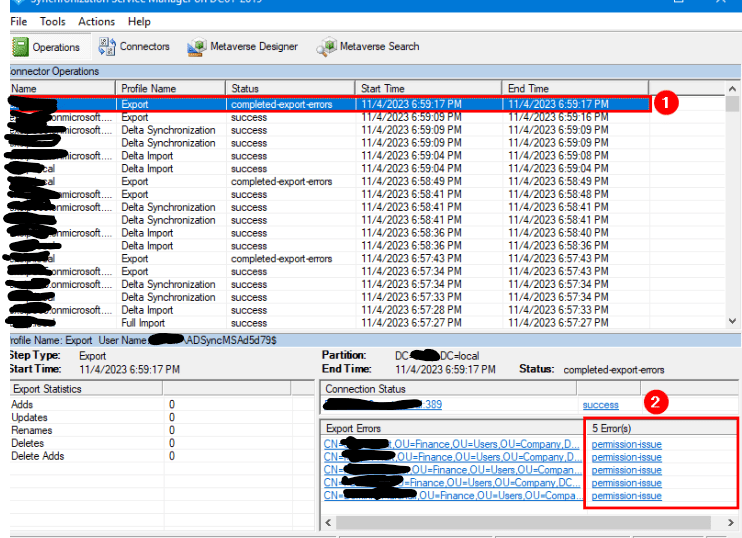
I opened Azure AD Connect Synchronization services and ran the sync and noticed there were permission errors.
Fix
- You need to get Msol user that is used to sync on-prem objects to Azure AD. You can search for Msol in AD OR you can look it up on connectors tab in Azure AD Synchronization service.
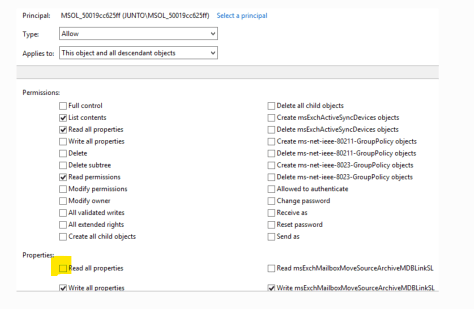
- Open ADUC – Open the properties of User having issue permission issues as per the above screenshot and go to Security tab – Advanced – Add.
- Click on “Select Principal” and then add the Msol user that you got in step 1.
- Check “Read all properties” – OK – Apply – OK.
- Repeat this process for all the users that are showing as permission issue and then run the sync again. It will sync successfully.

 Salman Tariq
 SalmanTechBlogs
Leave a comment