
I recently came up with a request to get a list of all members of a distribution group which can easily be done using Power shell.
Get-DistributionGroupMember -Identity “testgroup@xyz.com”
This will output all members of the group including other groups.
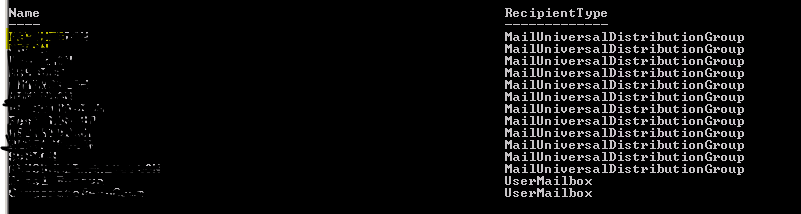
Other groups have nested groups as well so it would be cumbersome process to get the members from all nested groups and come up with a report.
I used the following script instead which gets members of a group and if a member is a group then it gets its members as well, this process runs recursively until all members of all nested groups are listed.
Copy the following script in a Notepad and save it as a .ps1 file for e.g. distrolist_script.ps1. Don’t forget to change $group to whatever distribution group you are trying to get members of.
This will output all members of the the distribution group and also nested groups if any. If you want the output to be saved to a CSV file, you can do so as follows and it will save the file in the same location the script is at.

## Install Exchange Snapin
Add-PSSnapin Microsoft.Exchange.Management.PowerShell.E2010 -ErrorAction SilentlyContinue; #2010

## Clear the screen
   cls

## Set Variables:
    $group = "testgroup@xyz.com"
    $members = New-Object System.Collections.ArrayList

## Create the Function
    function getMembership($group) {
        $searchGroup = Get-DistributionGroupMember $group -ResultSize Unlimited
        foreach ($member in $searchGroup) {
            if ($member.RecipientTypeDetails-match "Group" -and $member.DisplayName -ne "") {
                getMembership($member.DisplayName)
                }
            else {
                if ($member.DisplayName -ne "") {
                    if (! $members.Contains($member.DisplayName) ) {
                        $members.Add($member.DisplayName) >$null
                        }
                    }
                }
            }
        }

## Run the function
    getMembership($group)

## Output results to screen
    $members.GetEnumerator() | sort-object
 Salman Tariq
 SalmanTechBlogs
Can we know how to modify the script if we want member of which group
LikeLike
If you just want members of a specific group, you can run the following. Or is it something else?
Get-DistributionGroupMember -Identity “testgroup@xyz.com
LikeLike
How can I modify to script to eliminate duplicate users?
LikeLike
You can’t have a user added twice in a group. Do you mean that if the same user is a member of the nested groups you only want to see it once rather appearing several times?
LikeLike
Thanks salman for the reply, your output gives report of the members display name, I like to have the group names in the 2nd column to identify the members are part of which nested groups
LikeLike
$members.GetEnumerator(), $group | sort-object
LikeLike
Thanks for the reply, but I was looking to get the names of sub groups
LikeLike
Hi Tariq, thanks for writing such a great script to solve a problem we were looking to solve. I’ve slightly modified it so it’ll now ask for your credentials as well as the distribution list you would like the members for – so no longer have to edit the file depending on group.
Here is the modified script:
## Install Exchange Snapin
Add-PSSnapin Microsoft.Exchange.Management.PowerShell.E2010 -ErrorAction SilentlyContinue; #2010
## Clear the screen
cls
## Set Variables:
$UPN = Read-Host “Please enter your full email address”
$group = Read-Host “Please enter the full email address of the list you want the members of”
$members = New-Object System.Collections.ArrayList
## Prompt to connect to ExchangeOnline
Connect-ExchangeOnline -UserPrincipalName $UPN
## Create the Function
function getMembership($group) {
$searchGroup = Get-DistributionGroupMember $group -ResultSize Unlimited
foreach ($member in $searchGroup) {
if ($member.RecipientTypeDetails-match “Group” -and $member.DisplayName -ne “”) {
getMembership($member.DisplayName)
}
else {
if ($member.DisplayName -ne “”) {
if (! $members.Contains($member.DisplayName) ) {
$members.Add($member.DisplayName) >$null
}
}
}
}
}
## Run the function
getMembership($group)
## Output results to screen
$members.GetEnumerator() | sort-object
LikeLike
Thanks
LikeLiked by 1 person
One note, I tried changing the Output screen to:
$members.GetEnumerator(), $group | sort-object
However, that only outputs the group I searched for.
I then tried:
$members.GetEnumerator(), $searchGroup | sort-object.
However, that gave a blank output.
As someone else mentioned, it would be great if the group they were a member of was printed to the right of the name but those outputs don’t have the intended affect.
Thanks!
LikeLike
Did anyone get an answer on how to add what group the account is in displayed for the member?
LikeLike
You can use following script too to get a list of all distros in AD along with its members.
#Import Active Directory Module
Import-Module ActiveDirectory Function to get group members recursively
#function Get-GroupMembers {
param (
[Parameter(Mandatory = $true)]
[string]$GroupName)
# Get members of the group$members = Get-ADGroupMember -Identity $GroupName -Recursiveforeach ($member in $members){ if ($member.objectClass -eq 'group') {# If the member is a group, recursively get members of the nested groupWrite-Host "Nested Group: $($member.Name)"Get-GroupMembers -GroupName $member.SamAccountName }else{ # Otherwise, output the user detailsWrite-Host " - $($member.Name) ($($member.SamAccountName))" } }}
#Get all distribution groups in Active Directory
$distributionGroups = Get-ADGroup -Filter {GroupCategory -eq “Distribution”}
#Loop through each distribution group
foreach ($group in $distributionGroups) {
Write-Host “Group: $($group.Name)”
# Get group membersGet-GroupMembers -GroupName $group.SamAccountNameWrite-Host "`n" # Line break between groups}
LikeLike