Protecting yourself from phishing emails is crucial to maintaining your online security. Phishing emails are designed to trick you into revealing personal information, such as passwords, credit card numbers, or other sensitive data. Here are some steps you can take to protect yourself from phishing emails:
- Be Skeptical: Always be cautious when receiving unexpected emails, especially if they ask for personal information, login credentials, or financial details. Even if an email appears to be from a trusted source, take a closer look to verify its authenticity.
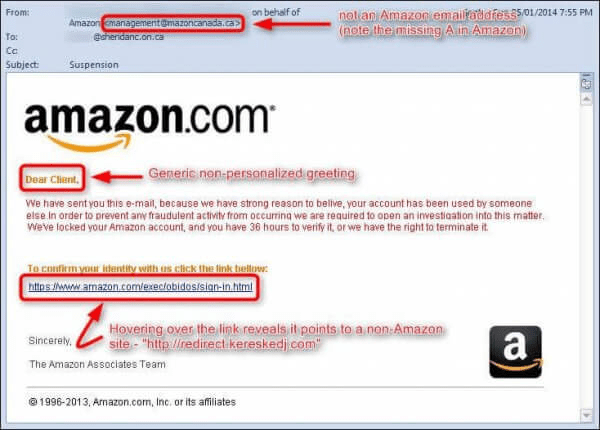
- Check the Sender’s Email Address: Phishers often use email addresses that look similar to legitimate ones. Double-check the sender’s email address to make sure it matches the official domain of the organization they claim to be from.
- Don’t Click on Suspicious Links: Hover your mouse over any links in the email to see where they lead before clicking. If the URL looks suspicious or doesn’t match the official website of the supposed sender, do not click on it.
- Verify Requests for Personal Information: Legitimate organizations typically won’t ask you to provide sensitive information via email. If you receive an email asking for such information, contact the organization directly through official channels to confirm the request’s authenticity.
- Avoid Sharing Personal Information: Never share personal or financial information via email. Legitimate companies won’t request this information through email.
- Use Multi-Factor Authentication (MFA): Whenever possible, enable MFA for your online accounts. This adds an extra layer of security by requiring a second form of verification, such as a code sent to your phone, in addition to your password.
- Keep Software Updated: Ensure your operating system, web browsers, and security software are up to date. This helps protect against vulnerabilities that phishers may exploit.
- Use Email Filters: Many email providers offer built-in spam filters that can help detect and filter out phishing emails. Make sure these filters are enabled.
- Beware of Urgent or Threatening Language: Phishing emails often use urgent language to create a sense of panic. Be cautious of emails that claim your account will be closed or that your information will be lost unless you take immediate action.
- Educate Yourself: Stay informed about common phishing tactics and techniques. Being aware of the latest phishing trends can help you recognize suspicious emails more easily.
- Verify Requests for Money: Be cautious of emails requesting money transfers, especially if they come from unexpected sources. Always verify such requests through other communication channels before taking any action.
- Use Strong Passwords: Create strong, unique passwords for your online accounts. This can help prevent unauthorized access even if your credentials are compromised elsewhere.
- Regularly Check Your Accounts: Periodically review your bank statements, credit reports, and other accounts for any unauthorized activity.
- Report Phishing: If you receive a phishing email, report it to your email provider or the appropriate organization. This can help prevent others from falling victim to the same scam.
By following these steps and maintaining a vigilant approach to your online interactions, you can significantly reduce the risk of falling victim to phishing attacks.
Following is an example of a phishing email.
 Salman Tariq
 SalmanTechBlogs
Leave a comment