Recently, we moved few mailboxes to Exchange 2016 from Exchange 2010 and most of them did work but some of them we ended up recreating the profile and it worked. but some of them didn’t work even after recreating the outlook profile.
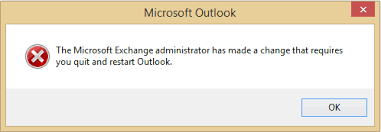
This was tested on Outlook 2010 SP2, Outlook 2013 and Outlook 2016. Errors varied from client to client and if I tried to create a new profile, the following error would pop up:
The Microsoft Exchange administrator has made a change that requires you to quit and restart Outlook.
In some instances, I was just getting Authentication prompt box repeatedly even after entering the correct credentials.
It turns out it’s due to autodiscover as Exchange 2013 / 2016 continues to proxy the autodiscover request to Exchange 2010.
The fix is to run the following on Exchange 2013 / 2016 Server(s). Please make sure you open Exchange Management shell as Admin before executing the following command.
Restart-WebAppPool MSExchangeAutodiscoverAppPool
Or you can run the following command if you have multiple exchange servers because this needs to be run on all exchange 2013 / 2016 servers. This way you don’t have to manually log on to each exchange server or manually connect remotely to each server to execute the above command
Invoke-command -computername exch1,exch2,exch3 -ScriptBlock { Restart-WebAppPool MSExchangeAutodiscoverAppPool}
 Salman Tariq
 SalmanTechBlogs
Leave a comment