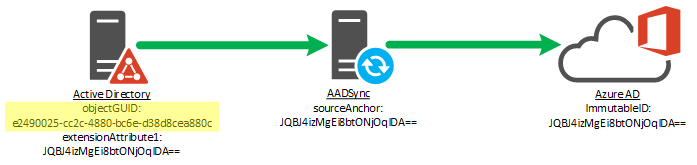
There has been instances where Azure AD complains about having duplicate UserPrincipalNames and / or duplicate accounts are created on O365 after running sync with on-prem AD.
Before we dive into the fix, just want to give you some back ground as to what happens when you sync on-prem AD objects to O365.
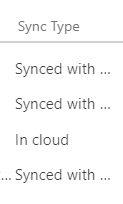
When you create something on O365 it is a Cloud Only account. Whereas when you create something on on-prem AD and then sync it to O365 it’s called Sync’d account, you can see this under the Sync Type column on O365 Portal.
ImmutableID (Source Anchor) uniquely identifies an object as being the same object on on-prem and in Azure AD. Immutable means unique or something that cannot be changed.
So most of the errors are due to that i.e. we create an account on on-prem AD and the sync, technically it should sync that account to Azure and show up there as Sync’d account unless some other account on Azure already has same UPN / SMTP as the on-prem account that you are syncing.
So you want to make sure that the account you are trying to sync to Azure is unique and has unique values i.e. UPN / SMTPs or else it won’t work.
Another scenario is that you already have cloud accounts and you want to convert them to Sync’d accounts. You create the accounts on on-prem AD with same UPN / SMTPs as the cloud one and when you run the sync, cloud account should change to sync’d account. Now if those values don’t match and you run the sync, it’ll create duplicates on Azure. So you’ll end up having 2 accounts one being in cloud (original) and another one as Sync’d.
In order to fix this issue, you need to either delete the AD account on on-prem if possible so that’ll delete the cloud account that got created because of it. If you’re not able to delete it then move it to an OU which is not being Sync’d to Azure that way cloud account will get deleted. It will be soft deleted. So you have to remove it from deleted items as well using the following Power shell command.
To get the list of users in deleted items:
Get-MsolUser -ReturnDeletedUsers | Format-list UserPrincipalName
To permanently remove it:
Remove-MsolUser -UserPrincipalName abc@xyz.com -RemoveFromRecycleBin
Now this is a very annoying process. Cloud Accounts don’t have immutable IDs so you have to basically set on-prem AD account immutable ID to the Azure Cloud Account and that’ll link them and make Azure account sync’d account. This is if the sync’s is not working.
First step is to get the immutable ID for on-prem AD account.
- $guid = (get-aduser -server dcname.domain.com -identity samaccountname).objectGuid
- $bytearray = $guid.tobytearray()
- $immutableID = [system.convert]::ToBase64String($bytearray)
- Make a note of that Immutable ID.
Now to set the immutable ID to the azure AD account you need to first change its UPN to managed domain i.e. onmicrosoft.com.
Move the federated domain onto a managed domain:
- Set-MsolUserPrincipalName -UserPrincipalName sam@xyz.com -NewUserPrincipalName sam@xyz.onmicrosoft.com <managed domain, usually something.onmicrosoft.com
- Set immutableid to null if it is not already null (most likely it will be null if cloud account but confirm)
- Set-MsolUser -UserPrincipalName sam@xyz.onmicrosoft.com-ImmutableId “$null”. Then wait for some time and assign a new immutable id.
- Set-msolUser -userprincipalname sam@xyz.onmicrosoft.com-immutableID f33fc1d2-73bd-4957-995f-37c83d349ef3
Move back to federated domain:
5. Set-MsolUserPrincipalName -NewUserPrincipalName sam@xyz.com sam@xyz.onmicrosoft.com
6. Get-MsolUser -UserPrincipalName sam@xyz.com | select ImmutableId
On O365 Portal, you should see sync type for this account should have changed to Synced from…
Please close and re-open O365 portal to see the change.
Microsoft has recently made some changes so step 3 – 4 doesn’t always work so there are slightly different commands you can run instead. Step 1 and 5 still needs to be done.
Set-AzureADUser -ObjectId xxxxxxxxxxxx -ImmutableId dfgt4346egeg
You can get object id using:
Get-AzureADUser -UserPrincipalName xyz@abc.onmicrosoft.com | fl objectid
 Salman Tariq
 SalmanTechBlogs
Leave a comment