Issue: When an external user is sending an email to a distribution group which consists of both internal and external users. Emails to internal users get delivered but fails to be delivered to external members of the group. Sometimes the sender doesn't even get NDR as they might not have been enabled. You can always... Continue Reading →
Script To Get A List Of All Mailboxes Along with All its Email Aliases
Connect to Exchange Online $UserCredential = Get-Credential$Session = New-PSSession -ConfigurationName Microsoft.Exchange -ConnectionUri http://outlook.office365.com/powershell-liveid/ -Authentication Basic -AllowRedirection:$true -Credential $UserCredentialImport-PSSession $Session -DisableNameChecking:$true -AllowClobber:$true | Out-Null Get all Exchange Online users $AllUsers = Get-Mailbox -ResultSize Unlimited Iterate through each user and retrieve email address aliases foreach ($User in $AllUsers) {$UserPrincipalName = $User.UserPrincipalName$PrimarySMTP = $User.PrimarySmtpAddress$EmailAliases = $User.EmailAddresses # Output... Continue Reading →
Email Spoofing

Email spoofing is a common technique used by cybercriminals to send fraudulent emails that appear to come from a trusted source. This practice can put individuals and organizations at risk of falling victim to phishing attacks, malware infections, and other types of cyber threats. To prevent email spoofing, several email authentication protocols such as SPF, DKIM, and DMARC have been developed. These protocols work by verifying the authenticity of the sending domain, checking the content of the email, and enforcing policy-based actions. By implementing these protocols, domain owners can protect their brand reputation, improve email deliverability, and provide a safer email experience for their users.
Script to list The Members of Nested Distribution Groups
Connect to Exchange Online PowerShell $UserCredential = Get-Credential$Session = New-PSSession -ConfigurationName Microsoft.Exchange -ConnectionUri https://outlook.office365.com/powershell-liveid/ -Credential $UserCredential -Authentication Basic -AllowRedirectionImport-PSSession $Session Get list of all distribution groups $groups = Get-DistributionGroup -ResultSize unlimited Loop through each group and get its members foreach ($group in $groups) {Write-Host "Group: $($group.Name)"$members = Get-DistributionGroupMember -Identity $group.Name -ResultSize unlimitedforeach ($member in $members)... Continue Reading →
Mailbox Calendars Permissions For All Users
Following power shell commands can be used to get a list of all Exchange user's mailbox calendar permissions. Output will list all users along with the users that have permission to their calendars and also permission level. $Mailboxes = (get-mailbox -database dbname) $Mailboxes | ForEach {Get-MailboxFolderPermission -Identity “$($_.alias):\Calendar” | Select User, Identity, AccessRights} You can... Continue Reading →
The ACE doesn’t exist on the object Mailbox Permissions
If you have recently upgraded from exchange 2013 or older to 2016/2019, you might experience the following when you try to remove mailbox permissions using exchange PowerShell. It will let you remove the permissions using exchange admin centre without any error sometimes but when you go back to check the permissions, you will notice that... Continue Reading →
Emails Being Rejected on O365: Bare Line Feed Characters
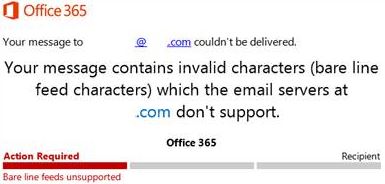
This usually happens when a 3rd party server is emailing you which includes characters which causes emails to be rejected. Microsoft used to remove these characters before, but they stopped doing so. As per Microsoft documentation, receive connector need to be adjusted to fix this but that applies to on-prem exchange only. I couldn’t find... Continue Reading →
This User’s On-premises Mailbox Hasn’t Been Migrated To Exchange Online In Microsoft Office 365 – New Office 365 Tenant
Issue We get the following message after assigning the license to a synchronized user in new Office 365 Tenant and it gets stuck there. This can happen when migrating from on-premise Exchange to newly created Office 365 and we use AD Connect to sync AD accounts to office 365. This can happen due to some... Continue Reading →
How To Get A list Of All Mounted Databases on Exchange Server
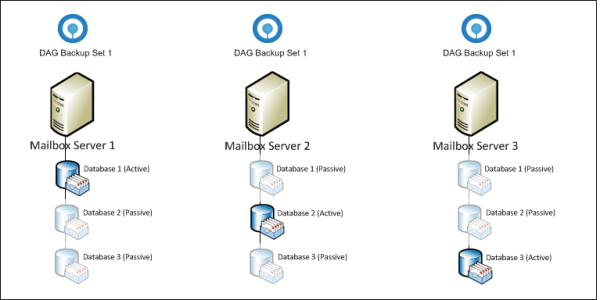
In a DAG Environment, where you have got multiple exchange servers in a DAG it's important to know the exact number of databases on each server to make sure no server has more load than the other and all databases are equally balanced across the servers in DAG. Following command will give you the number... Continue Reading →
Generating a Report of Mailboxes Who Have Crossed Quota Threshold
Recently, I have got a request to send a copy of all users who are reaching or at or above mailbox quota threshold to one of the Administrators. By default, quota threshold limit notifications are sent to users themselves only. Even if an Exchange Transport rule is set up for this, it won't work. Following... Continue Reading →
 Salman Tariq
 SalmanTechBlogs